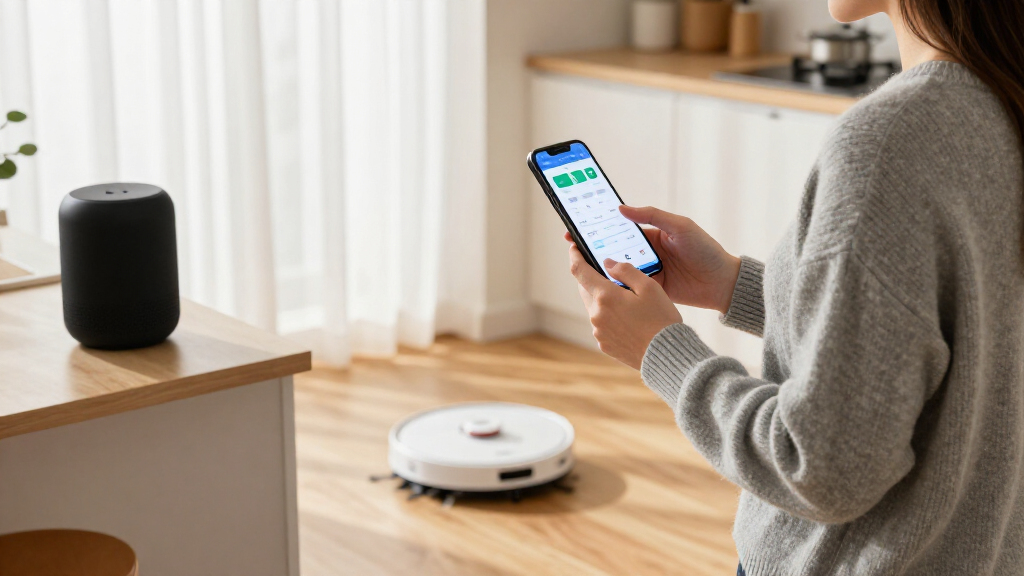
Choosing between Amazon Alexa and Google Home is less about picking a smart speaker and more about deciding which platform will control your lights, plugs, cameras, thermostats, and routines. Both can handle common commands and work with a wide range of connected products, but their strengths differ: Alexa tends to give you more compatible-device choices and automation flexibility, while Google Home fits more naturally into households already using Google services and Assistant features.

Get your next haul delivered free with Prime
- Fast, free delivery on millions of items
- Prime Video, Amazon Music and more included
- Member-only deals all year

Kasa Smart Wi-Fi Plug HS103P4, 4-Pack, 15A, Alexa and Google Home Compatible
- ✔ Pack size: 4 plugs
- ✔ Model: HS103P4
- ✔ Connectivity: 2.4 GHz Wi-Fi
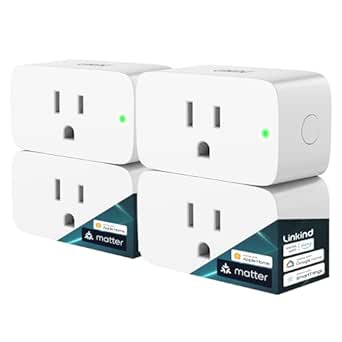
Linkind Matter Smart Plug, 4-Pack
- ✔ Pack size: 4 plugs
- ✔ Model: LC09003256
- ✔ Connectivity: 2.4 GHz Wi-Fi; IPv6 network required
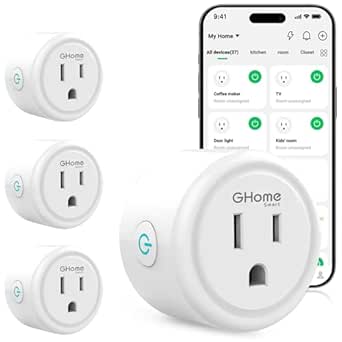
GHome Smart Wi-Fi Plug with App and Voice Control, 4-Pack
- ✔ Pack size: 4 plugs
- ✔ Model: WP3
- ✔ Connectivity: 2.4 GHz Wi-Fi; Bluetooth support listed
The practical decision is whether you value breadth and customization or a smoother connection to Google accounts and services. Alexa is the better starting point for a mixed-brand setup or a home where you want to build detailed routines. Google Home is a sensible choice for Android and Google users who want voice control with less ecosystem friction. Neither platform guarantees that every device will work exactly as expected, so check compatibility for the specific products you plan to use before buying.
At a Glance
| Criteria | Amazon Alexa | Google Home | Winner |
|---|---|---|---|
| Compatible devices | Broad device selection across many brands; check each product’s Alexa support. | Wide compatibility, though availability varies by product, region, and supported features. | A |
| Voice assistant | Alexa handles common commands well and supports a broad range of smart-home actions. | A natural fit for users who already use Google Assistant and Google services. | Depends |
| Automation and routines | Strong routine and customization options, with extensive device-trigger combinations. | Supports useful household routines, with the available actions depending on devices and software. | A |
| Setup and everyday use | Straightforward for basic use, though deeper setup can involve more settings and skills. | Especially convenient for people already using Android and Google Home. | B |
| Google and Amazon service integration | Best fit for Amazon services and compatible Echo devices. | Best fit for Google accounts, Android, and compatible Nest products. | Depends |
| Privacy and account controls | Controls are available, but settings and options vary by device and service. | Controls are available through Google accounts and device settings; review each product’s options. | Depends |
| Long-term flexibility | A strong choice for varied brands and users who want room to expand. | A strong choice for Google-centered households, though features can depend on the product lineup. | A |
Kasa Smart Wi-Fi Plug HS103P4, 4-Pack, 15A, Alexa and Google Home Compatible
Kasa HS103P4 is our best overall pick because it makes the core smart-plug jobs easy to understand: connect an appliance, control it in the Kasa app, or use Alexa or Google Assistant to switch it and set schedules. The four-pack gives us a simple way to automate several lamps or fans without buying a separate hub. Remote app control is also useful when we want to check or operate a connected device away from home.Compared with Linkind, Kasa is the less demanding choice for a household that only needs Alexa or Google control: Linkind’s Matter reach is broader, but some of its platform connections need a Matter-certified controller and IPv6. Kasa’s tradeoff is that its compatibility story is narrower and setup depends on the Kasa app and a 2.4 GHz Wi-Fi connection. Buyers looking for cross-platform Matter flexibility should consider Linkind instead.The stated 15 A and 1800 W maximum gives Kasa the same listed capacity as Linkind and more headroom than GHome’s 1200 W specification. That does not mean every appliance is suitable; we should check its load and follow the plug’s limits. The UL certification and two-year manufacturer warranty add useful buying information, but the plug still relies on the home network and a compatible smartphone for setup.
Pros:
- Controls compatible appliances by app, voice, schedule, or timer.
- Works with Alexa and Google Assistant without a separate hub.
- Four plugs provide a practical starting set for multiple lamps or fans.
- UL certified, with a stated maximum of 1800 W and a two-year manufacturer warranty.
Cons:
- Requires a 2.4 GHz Wi-Fi connection and the Kasa app for setup.
- Offers a narrower stated ecosystem range than the Matter-compatible Linkind option.
Best for: Households starting with smart plugs that want app, remote, Alexa, or Google Assistant control without adding a hub.
Not ideal for: Buyers who need Matter-based integration across several ecosystems, or anyone without a 2.4 GHz Wi-Fi network and compatible smartphone.
Bottom line: For a typical Alexa or Google household, Kasa offers the clearest balance of uncomplicated setup, useful automation, and four-plug coverage.
“For a typical Alexa or Google household, Kasa offers the clearest balance of uncomplicated setup, useful automation, and four-plug coverage.”
Linkind Matter Smart Plug, 4-Pack
Linkind is the strongest fit for a home built around Matter, with stated compatibility across Apple Home, Siri, Alexa, Google Home, and SmartThings, as well as the AiDot app. That breadth can help us choose plugs that fit an existing multi-platform setup rather than committing to the narrower Alexa-and-Google focus of Kasa or GHome. It also supports scheduling, timers, and remote control.Its most distinctive benefit is local-network control during an internet outage for Matter devices on the same local network. That is a meaningful difference from a basic Wi-Fi plug when home internet is unavailable, but it should not be mistaken for a guarantee that every remote or cloud feature continues working. There is also a setup cost in complexity: several named platforms require a Matter-certified hub or controller, and the network must support IPv6. The AiDot app can be used without a hub, which provides an alternative, but platform choice affects the experience.Compared with Kasa, Linkind is more flexible but less plug-and-play for buyers who lack a Matter controller. Compared with GHome, it offers the more expansive stated smart-home platform list and a higher 1800 W maximum, while GHome emphasizes app sharing and grouped control. Linkind’s fire-resistant materials and short-circuit and overload protection are useful stated safety features, with FCC and ETL certifications. Buyers should still verify appliance load and network requirements before choosing it.
Pros:
- Matter compatibility spans Apple Home, Alexa, Google Home, and SmartThings.
- Local-network control can continue for Matter devices on the same network during an internet outage.
- Supports schedules, timers, and remote control.
- Lists a 15 A, 1800 W maximum and fire-resistant materials with short-circuit and overload protection.
Cons:
- Requires 2.4 GHz Wi-Fi and an IPv6 network.
- A Matter-certified hub or controller is required for several supported ecosystems.
Best for: People already using, or deliberately setting up, a Matter-compatible smart home and who want plugs to work across supported platforms.
Not ideal for: Buyers who want the fewest setup requirements, lack an IPv6 network, or do not have a Matter controller for their preferred platform.
Bottom line: Choose Linkind when cross-platform Matter support is the priority and the required network and controller are already part of the plan.
“Choose Linkind when cross-platform Matter support is the priority and the required network and controller are already part of the plan.”
GHome Smart Wi-Fi Plug with App and Voice Control, 4-Pack
GHome’s standout is household coordination: its four plugs support schedules, timers, groups, and app sharing, making it a sensible option when more than one person needs to manage connected appliances. It works with Alexa and Google Home and lists compatibility with GHome, Smart Life, and Tuya apps. Like Kasa, it does not require a hub, so it can suit buyers who want familiar voice control without building a Matter setup.Compared with Kasa, GHome puts more emphasis on app choice and shared or grouped control, while Kasa has the clearer stated electrical headroom at 1800 W and a UL certification. GHome lists a 1200 W maximum, so we should be more cautious about the intended appliance and confirm its requirements before connecting it. It is not the right pick simply because it includes four plugs: capacity and the appliance’s electrical characteristics matter more than pack count.The initial voice setup also takes an extra step: buyers must set up the plugs through the GHome app before using Alexa or Google Assistant. Bluetooth connection support is listed alongside 2.4 GHz Wi-Fi, but the supplied details do not make it a replacement for checking Wi-Fi needs. Compared with Linkind, GHome avoids the stated Matter-controller requirement but does not list Matter or the same broad platform support. For a household seeking group routines rather than broad ecosystem interoperability, that can be a reasonable distinction.
Pros:
- Supports app, remote, schedule, timer, and voice control.
- Group control and app sharing suit multi-person households.
- Works with Alexa and Google Home and lists GHome, Smart Life, and Tuya app compatibility.
- Four plugs are included and no hub is required.
Cons:
- Lists a 1200 W maximum, below the 1800 W stated for Kasa and Linkind.
- Requires 2.4 GHz Wi-Fi, with voice control set up through the GHome app first.
Best for: Households that want to share control across family members or group several compatible devices into coordinated routines.
Not ideal for: Buyers with appliances that need more than the stated 1200 W limit, or people who want Matter support or the shortest voice-assistant setup.
Bottom line: GHome makes the most sense for shared app-based routines, provided its lower stated wattage limit suits the appliances you plan to control.
“GHome makes the most sense for shared app-based routines, provided its lower stated wattage limit suits the appliances you plan to control.”
As an Amazon Associate we earn from qualifying purchases.
Key Differences
The most meaningful gap is not whether either platform can turn on a lamp; both can do that with compatible devices. The difference shows up as a home grows. Alexa’s broad support and flexible routines can make it easier to mix brands or build custom actions around schedules and device states. That advantage matters most to people who enjoy tuning their setup. It matters less if you only need a few lights, plugs, and spoken commands.
Google Home’s strongest case is convenience for households already using Google accounts, Android phones, or Nest products. Familiar services can make daily control feel more connected, and many users may prefer keeping devices and voice access in one environment. The tradeoff is that feature availability still depends on the specific product, software, and region; a Google-branded ecosystem does not remove the need to check compatibility.
For value, compare the whole setup rather than the price of one speaker. The better platform is the one that supports the devices you want without forcing you to replace working equipment or buy extra hubs. Alexa is the more versatile default for a varied device collection; Google Home is worth choosing when its service integration makes everyday use simpler. For either one, confirm support for the exact features you need before committing.
Detailed Comparison
Compatible devices (Amazon Alexa wins — moderate)
Alexa wins by a moderate margin for breadth and flexibility. Both platforms support many popular categories, but Alexa is often a safer first check when a household is combining products from several manufacturers. Compatibility is not universal: support for basic on/off control does not always mean support for every feature, such as camera feeds, energy readings, or advanced settings. In practice, Alexa gives eclectic setups more room to grow, while Google Home can be just as suitable when the devices you already own are supported.
Voice assistant (moderate difference)
This is a genuine preference-dependent comparison. Alexa offers broad smart-home command coverage and can be a good fit for users who want voice access to many device types. Google Home has a natural advantage for people accustomed to Google Assistant and its connected services. The gap is minor for straightforward requests such as changing a light or setting a timer, but it can feel larger if your household depends on a particular assistant’s account access or familiar phrasing. Test the commands that matter to you rather than assuming one assistant will understand every request better.
Automation and routines (Amazon Alexa wins — moderate)
Alexa wins by a moderate margin when customization is the priority. Its routine options can help users coordinate several devices around time, voice commands, or supported triggers. Google Home also handles useful household routines, but the exact available actions depend on the devices and software in use. For someone who wants lights, plugs, and other products to react in a specific sequence, Alexa is generally the more appealing platform. For simple schedules and one-step commands, the difference is unlikely to justify switching.
Setup and everyday use (Google Home wins — minor)
Google Home has a minor edge for people already using Android and Google services because familiar accounts and products can reduce setup friction. Alexa remains accessible for basic use, although users who want more tailored behavior may spend time configuring routines and device settings. Neither platform is effortless with every brand: products may require their own app, account, or linking step. The practical winner is the one that works with your existing phone and accounts, especially if other household members will also manage the system.
Service integration (moderate difference)
There is no universal winner. Google Home is the clearer fit for a household centered on Android, Google accounts, and compatible Nest products. Alexa makes more sense for users invested in Amazon services and Echo devices. These connections influence more than voice commands: they can affect which app you open, which account manages the device, and how naturally the smart home fits into daily habits. Choose the platform that matches services you already use rather than paying to recreate an ecosystem you do not need.
Privacy and account controls (moderate difference)
Neither platform earns a clear overall win. Both involve account settings, voice-assistant controls, and device-specific choices, and the available controls can differ by product and service. The meaningful step is to review the settings for the assistant and each connected device, including microphone behavior, saved activity, camera access, and household permissions where relevant. A privacy-conscious buyer should compare the exact devices and settings rather than assume a platform name alone determines how much data is collected or retained.
Long-term flexibility (Amazon Alexa wins — moderate)
Alexa wins by a minor-to-moderate margin for people who expect to combine brands or keep adding devices over time. Its breadth can make it easier to find compatible products across different categories. Google Home is still a capable base, especially for a Google-centered household, but buyers should confirm that future products support the features they want. Either way, choosing devices with broad platform support can reduce the cost and frustration of changing assistants later.
Amazon Alexa: Pros and Cons
Pros:
- Broad compatibility gives mixed-brand households more options.
- Flexible routines suit users who want to customize how devices work together.
- A strong match for households already using Echo devices or Amazon services.
Cons:
- More customization can mean more settings and setup work.
- Support for a product does not always include every advanced feature.
- Not the most natural fit for households centered on Google accounts and services.
Google Home: Pros and Cons
Pros:
- A comfortable fit for Android users and households already using Google services.
- Convenient integration with compatible Nest products and Google accounts.
- A capable choice for common voice commands and straightforward routines.
Cons:
- Compatibility and feature coverage still vary across third-party products.
- Less compelling for buyers who want the broadest device choices or extensive routine customization.
- The ecosystem advantage is smaller for households that do not use Google services.
Who Should Choose What
Choose Amazon Alexa if:
- You are building a mixed-brand smart home and want as many compatible device choices as possible.
- You plan to create detailed routines that coordinate several devices.
- You already use Echo devices or Amazon services and want to keep control in that ecosystem.
Choose Google Home if:
- Your household uses Android, Google accounts, or compatible Nest products every day.
- You want a smart home that fits into services and devices you already use.
- Your needs are mostly common voice commands, schedules, and basic device control.
Skip both if: Skip both as a platform commitment until you confirm that your essential devices support the same ecosystem and required features. If you want local control, minimal cloud reliance, or extensive advanced automation, compare dedicated smart-home hubs and open platforms as well.
Value for Money
Paying more for one ecosystem is worthwhile only when its specific advantages save effort or prevent replacement costs. Alexa is better value for a household that needs broad device choice and customizable routines; those strengths can matter as you add products. Google Home is better value when it works smoothly with your Android phone, Google account, or Nest devices, since familiar integration can be more useful than extra customization you will never use. Do not spend extra for a speaker or hub based on its assistant alone: compare the features, device compatibility, and total cost of the products you actually plan to connect.
Final Verdict
For most buyers starting a varied smart-home setup, choose Amazon Alexa. Its broader compatibility and stronger routine flexibility make it the safer default when you expect to add devices from different brands. Choose Google Home instead if your household already runs on Android and Google services or if compatible Nest products are central to the setup; that everyday integration can outweigh Alexa’s added flexibility. The biggest deciding factor is your existing devices and accounts, not a general claim that one assistant is better at every task. Check support for your specific products before buying, and skip both if your priority is a highly local, advanced system beyond what mainstream voice-assistant ecosystems provide.
Frequently Asked Questions
Is Alexa or Google Home better for a smart home?
Alexa is usually the stronger default for a home with devices from many brands or owners who want customizable routines. Google Home is a better fit for households already using Android, Google accounts, or compatible Nest products. For a few basic devices, either can work well if those exact products support the platform.
Can Alexa and Google Home control the same smart devices?
Many devices support both, but compatibility varies by product, region, and feature. A device may allow basic commands on both platforms while reserving some settings for its own app. Check the manufacturer’s compatibility list for the specific model and functions you need.
Which platform is easier to set up?
Google Home can feel simpler if you already use Android and Google services, while Alexa is straightforward for common commands and works with many brands. Either setup may require a separate manufacturer app or account. The easiest choice is usually the one that matches your phone, accounts, and existing devices.
Is it worth switching from Google Home to Alexa, or the other way around?
Switch only if the current platform lacks a feature or device support you actually need. Changing assistants can mean relinking devices, rebuilding routines, and adjusting household habits. If your setup works, adding a compatible device is often better value than replacing the whole ecosystem.